
How to Download
Follow these simple steps to download any TV series episode from Todaytvseries. The whole process takes less than a minute!
Choose Your Preferred Quality
On any series page, find the episode you want to watch. Click the download button for your preferred quality tier — choose between 720p x264 for a smaller file size or 1080p HEVC for HD quality. File sizes are shown on each button.

Generate Your Download Link
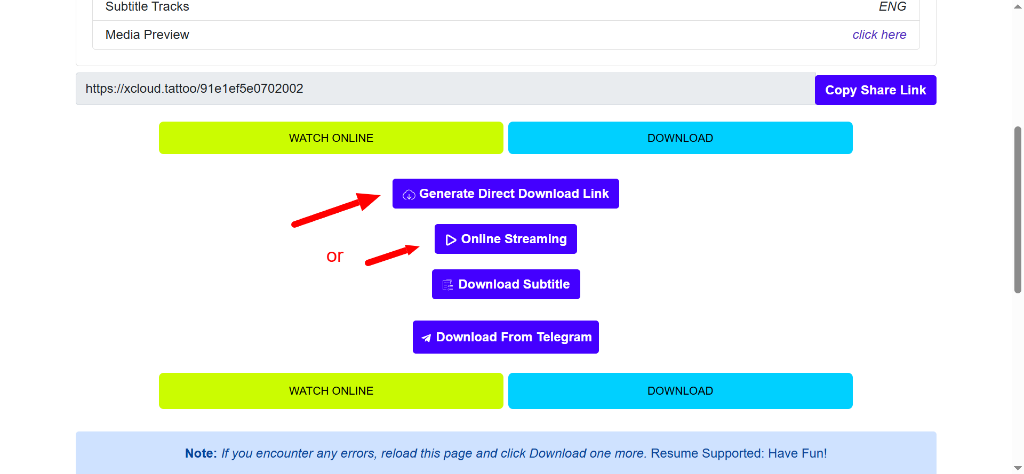
You'll be taken to the XCloud file hosting page. Once there, click the ⊙ Generate Direct Download Link button. You can also choose Online Streaming to watch directly in your browser, or Download Subtitle to grab the subtitle file.
Pick a Download Server & Save
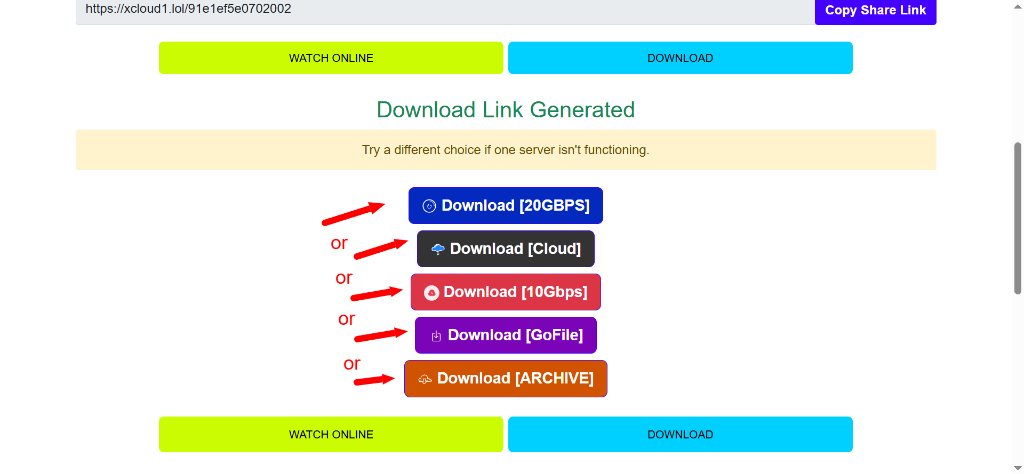
Several download servers will appear. Click any one of them to start downloading. If one server isn't working, simply try another — they all contain the same file!
Quick Tips
- Pop-ups? Just close any new tab or pop-up window that opens — they are ads from the file hosting site.
- Download failing? Reload the XCloud page and click the Download tab again. Resume is supported!
- Server down? Simply click a different server — all servers hold the exact same file.
- Quality choice: 720p is great for mobile or limited storage; 1080p HEVC offers the best picture quality.
- Want to stream? Click Online Streaming on the XCloud page to watch directly without downloading.
Ready to start watching? Browse our full library of TV series.
Browse TV Shows →